
User's Manual




2 SETUP AND INSTALLATION
6
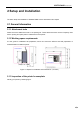
Figure 2.2 Printer nameplate
Model designation: It lists the product name, the model number and power requirement of the printer. The
nameplate also lists the related certification information and the company information of INTAMSYS.
Serial number: It lists the serial number of the printer, which will be provided to agent or INTAMSYS for
requesting services, so that the service personnel can quickly identify the configuration of your printer.
2.2 Machine Preparation
2.2.1 Remove package
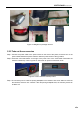
Step 1: Please remove the screws on wooden case with wrench having a 8mm sleeve. Remove the
packing cases on the top and around, and take off the fixing band, foam and packaging film on the
printer;
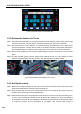
Step 2: Take out the wooden plate placed at the bottom of the printer, and fix it as two slope structures
with cross screwdriver. Based on the printer's wheel span, place the slope structures close to the
printer's bottom tray, and make them closely contact with the tray;
Step 3: There are four casters installed at the bottom of the machine. Clockwise rotate the knobs above
the casters to make the casters in movable state, and push the machine slowly onto floor along
the slope. Where any caster is too tight to be rotated by fingers, the spanner in packing case may
be used to help rotating (the spanner is in accessory box);
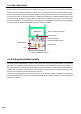
Step 4: In the process of printing, the movement of the printer's XY axis in high speed causes vibration of
machine, thus impacting the printing quality. To avoid the impact of machine vibration on printing
quality, please be sure to lock the 4 casters at the bottom of the printer. Anticlockwise rotate the
knobs above the casters to make the casters in fixed state.