
Datasheet



INSYS ETHERNET 5.X AT Command Reference
Nov-06 61
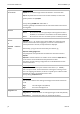
AT&W
Save settings
AT&W saves all current settings in the permanent memory. The settings are
restored from this permanent memory, when the device is switched on.
The following AT settings are stored:
AT&C, AT&D, AT#DTC, ATE, AT&K, AT&L, AT&O, AT#QUIET,
ATQ, AT&R, ATS0, ATS2, ATS8, ATS12, AT*S, AT&S, AT*U,
ATT, ATU, ATV, AT&X, AT*Y.
ATX
Dummy command
Command without effect, implemented for compatibility to the modem –
response “OK”.
AT&X
Shutting off the serial interface (RS232) via AT
AT&X0 The module reacts to AT commands via the serial inter-
face (default).
AT&X1 Via the serial interface, no serial interface is possible any
longer. Data connections will function as usual.
As soon as the AT interface has been switched off via the RS232, the device
can only be set via the TELNET configurator. A RESET will exit this mode as
long as no saving procedure with AT&W has taken place.
If the setting was saved permanently with AT&W , the device can be restarted
using a factory reset (3 RESET pulses).
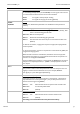
AT*Yx,y
Switch outputs
x: Port
0 Port UA1
1 Port UA2
y: Desired condition of the UAx output
0 Pin UAx low
1 Pin UAx high
Notes: If no port is specified (x), UA1 is used
Factory setting: AT*Y0,0 AT*Y1,0
ATZ
No function
Command without effect, implemented for compatibility to the modem –
response “OK”.
AT&Z0=<IP>:
<port>
or
AT&Z0=<domain
name>:<Port>
Remote terminal for automatic connection setup (leased line)
Example: AT&Z0=192.168.100.200:1234
Example: AT&Z0=“www.google.de“:80
For the automatic connection setup, see the description for AT&L.
AT&Z1=<IP>:
<port>
Remote terminal for the transmission of the I/O alarm inputs
Example: AT&Z1=192.168.100.200:1234
Function description of the transmission, see AT#IOT.