
Datasheet





AT Command Reference INSYS ETHERNET 5.X
60
Nov-06
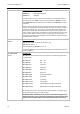
AT#TLP=
”<password>”
Password for remote configuration
AT#TLP="password" - in quotation marks! – maximum length: 8 charac-
ters. The entry is case sensitive.
Factory setting: insys
The user name and the Telnet port are determined with AT#TLU and
AT#TEL.
AT#TLU=“<name>“
User name for remote configuration
AT#TLU="name" - in quotation marks! – maximum length: 8 characters. The
entry is case sensitive.
Factory setting: insys
The password and the Telnet port are determined with AT#TLP and
AT#TEL.
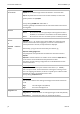
ATT
Select TCP mode
For the next connection ATT selects the TCP mode. This setting applies to
ATD commands without a specific protocol (e.g.
ATD192.168.100.200:1234) or for incoming calls.
ATU
Select UDP mode
For the next connection, ATU selects the UDP mode. This setting applies to
ATD commands without a specific protocol (e.g.
ATD192.168.100.200:1234) or for incoming calls.
AT*U<n>
Select the data format at the serial interface
The data format can be preselected with this command. The following for-
mats (data bits, parity, stop bits) are supported:
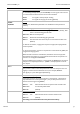
AT*U0 8N1 (default)
AT*U1 7E1
AT*U2 7O1
AT*U4 7E2
AT*U5 7O2
AT*U6 7N2
AT*U7 8E1
AT*U8 8O1
AT*U9 8N2
ATV<n>
Select message format (short or long format)
ATV sets the format for responses.
ATV0 This displays message numbers.
ATV1 The messages are displayed in clear text. (default)
AT&V<n>
Display settings and connection statistics
AT&V0 Displays the current and saved settings of the device.
AT&V1 Displays the diagnostic data of the last connection (connec-
tion partner, reason for disconnect).