
Datasheet





AT Command Reference INSYS ETHERNET 5.X
56
Nov-06
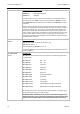
AT#NM=<sub net-
work mask>
Set network mask
AT#NM sets the address range of the local network in connection with
AT#IP. All packets that are not sent to the local network, are sent to the
gateway address set by AT#GW.
Factory setting: AT#NM=255.255.255.0
IP address, gateway and network mask must be coordinated in the local net-
work segment.
AT&O<n>
Set the function of the OH line
AT&O0 OH is active as soon as a physically functioning Ethernet link is
available, i.e. the module is connected to a hub/switch (default)
AT&O1 OH is active as soon as a connection (TCP/IP or UDP/IP) is active
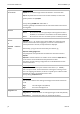
AT#PING<IP ad-
dress>
or
AT#PING “<domain
name>”
Send PING
AT#PING a.b.c.d sends an echo request (PING) to a remote terminal
(similar to the standard TCP/IP program). If an echo is received within a
timeout period of 2 seconds, the required time is displayed.
Alternatively, a ping can also be sent directly to a domain, e.g.
AT#PING“www.google.com“
The prerequisite is the specification of a DNS server with the command
AT#DNS.
AT#PING is used to check if an IP number can be reached. If AT#PING fails,
no connection can be established to the specified IP number.
The reason could be a wrong configuration or a firewall between the two
network subscribers.
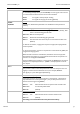
AT#PORT=<n>
Set local port number
AT#PORT=<n> sets the local port number to the value n (1..65535).
This is the port number at which the device is waiting for incoming connec-
tions. For outgoing connections, for which no specific port number has been
specified, this value is set as default value as well.
Factory setting: AT#PORT=1234
ATQ<n> Quiet control
This command switches the sending of messages via the serial interface on
or off.
ATQ0 Send messages to PC (default)
ATQ1 Don’t send messages to PC
AT#QUIET=<n>
Suppress switch-on message
AT#QUIET=0 Shows the switch-on message during the cold start (default)
AT#QUIET=1 Suppresses the switch-on message of the device