
Datasheet



Configuration Software HSComm Ethernet INSYS ETHERNET 5.X
30
Nov-06
File
Use the menu item "File" to save the current settings as shown in the HSComm user in-
terface as a file, or to re-read the settings.
Interface
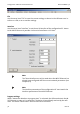
Use the menu item "Interface" to set the serial interface of the configuration PC. Access
to the INSYS Ethernet is possible via the serial interface or via Telnet.
Note
The Telnet interface can only be used when the INSYS Ethernet has
already been configured with the correct network parameters (see
Chapter 4.4).
Note
The interface parameters of the configuration PC must match the
interface parameters of the INSYS Ethernet.
Program settings
When "Automatic detection at program start" is activated, the HSComm detects the IN-
SYS Ethernet as soon as it is connected. The device is immediately read out by the soft-
ware. The button "Read values" does not need to be activated.