
Datasheet



INSYS ETHERNET 5.X Initial Operation
Nov-06 21
4.4.2 Initial configuration with HSComm Ethernet
As alternative to the configuration via HSComm, the device may also be configured via
AT commands (see Chapter Fehler! Ungültiger Eigenverweis auf Textmarke. )
Program start
Start the program HSComm Ethernet under Windows: StartAll Pro-
gramsINSYSHSCommHSComm Ethernet
The configuration software displays the window 'Basic settings' and searches
the set interface with the previously used settings (default = COM1, 19200,
8N1) for a connected INSYS Ethernet.
IP configuration
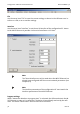
Switch to the window 'Network/Leased line operation'.
Set the required network parameters in the field 'IP settings' or activate the
DHCP. (in case of doubt please consult your responsible network administra-
tor.)
Use the button 'Send' to transmit the set parameters to the INSYS Ethernet.