
Daim Ntawv Qhia Tus Neeg Siv


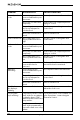
Table Of Contents
- Introduction
- PRECAUTIONS TO AVOID POSSIBLE EXPOSURE TO EXCESSIVE MICROWAVE ENERGY
- IMPORTANT SAFETY INSTRUCTIONS
- INSTALLATION GUIDELINES
- Cookware and cooking materials
- Features
- Setting up your microwave
- Setting the clock and the timer
- Cooking with your microwave
- Defrosting in your microwave
- Changing other microwave settings
- Cleaning and maintaining your microwave
- Troubleshooting
- Specifications
- ONE-YEAR LIMITED WARRANTY

20
www.insigniaproducts.com
Unevenly cooked
foods
You are trying to use
incorrect materials in your
microwave.
Use only microwave-safe materials.
The food is not defrosted
completely.
Defrost the food completely before
trying to cook it.
The cooking time or power
level is not adequate to
cook the food.
Use the correct cooking time and
power level.
The food is not turned or
stirred.
Turn or stir the food.
Overcooked foods The cooking time is too
long or power level is too
high.
Use the correct cooking time and
power level.
Undercooked
foods
You are trying to use
incorrect materials in your
microwave.
Use only microwave-safe materials.
The food is not defrosted
completely.
Defrost the food completely before
trying to cook it.
The cooking time is too
short or power level is too
low.
Use the correct cooking time and
power level.
Your microwave ventilation
ports are blocked or
restricted.
Make sure that the ventilation ports
are not blocked or restricted.
Improper
defrosting
You are trying to use
incorrect materials in your
microwave.
Use only microwave-safe materials.
The cooking time or power
level is not adequate to
cook the food.
Use the correct cooking time and
power level.
The food is not turned or
stirred.
Turn or stir the food.
The “:” colon on
the display is
blinking
This is normal behavior. The colon blinks to count seconds
when the clock is set.
The program
stops working
If any button on the control
panel sticks for one minute,
the display shows “FAIL”,
and a beep will sound once
every minute.
If your microwave oven is within one
year of purchase, contact Insignia
Customer Service.
If any button on the control
panel sticks permanently, a
beep will sound once every
minute.
PROBLEM POSSIBLE CAUSE POSSIBLE SOLUTION