
Dual-Screen DVD Player User Guide



39
I
ns
i
gn
i
a
NS
-
MVDS
7
/9
7
/9"
D
ua
l
-
S
creen
DVD
Pl
ayer
www.insignia-products.com
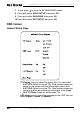
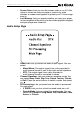
Preference Page
• TV Type–Lets you select the TV’s color system. You can select
PAL , Multi, or NTSC.
• Audio–Lets you select the DVD audio language if the DVD has
multiple audio languages.
• Subtitle–Lets you select the DVD subtitle language if the DVD
has multiple subtitle languages.
• Disc Menu–Lets you select the DVD menu language if the
DVD has multiple menu languages.