
User Manual





Product name : iCT220/iCT250 • 9/21
Copyright © 2012 Ingenico
900002734 R11 000 05/4012
All rights reserved
4. Installation and connection
4.1. Positioning the terminal
Install the terminal on a flat surface, with an easy access to an electrical outlet and telephone
line. Place the terminal away from any heat source and protected from dust, vibrations and
electromagnetic radiations (away from video terminals, PC, anti-shoplifting barriers ...).
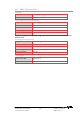
Operating conditions
Ambient temperature from +5°C to +40°C
Max relative humidity 85% at +40°C
Storage conditions
Storage temperature -20°C, +55°C
Max relative humidity 85% at +55°C
4.2. Connections
All connections are on the rear of the terminal protected by a cover.
*
according to the model
4.3. Installing the iCT220/iCT250 – Cable fixing
4.3.1. Opening the cable cover
• Unclip the cover by pushing simultaneously on the clips
1
with your nails finger as
shown on the figure here below.
• Lift the cover rearward to remove it, as shown by arrows on the figure.
Serial Link RS232
Telephone
USB Slave
Ethernet Link (Optional)
*
USB Host
Second Serial Link RS232
(Optional)*
Power Supply
1