
User Manual






Product name : iCT220/iCT250 • 15/21
Copyright © 2012 Ingenico
900002734 R11 000 05/4012
All rights reserved
5. Installing a paper roll
Your terminal is supplied with one paper roll. When the paper roll is nearing the end, a red
line will appear on the paper, this indicates that the paper roll must be replaced.
CAUTION
Use only paper approved by the manufacturer (diameter 40 mm). Use of unsuitable paper
is likely to damage the printer of your terminal (see characteristics at the chapter 7.1).
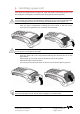
• Open the paper compartment by lifting the catch located at the rear of the
iCT220/iCT250 and pulls the cover to the rear of the terminal.
ATTENTION
Do not force the cover against the cables.
• Insert the paper roll in the compartment following the directions shown on the
figure below.
• Pull the paper up to the top of the terminal and hold it in this position.
• Maintain the paper and close the lid.
• Press the top of the lid in the center as shown by arrow, until it clips into position.
ADVICE
If you are inserting a new roll, tear off the first length (one complete turn).
LIFT