
User Manual






Product name : iCT220/iCT250 • 14/21
Copyright © 2012 Ingenico
900002734 R11 000 05/4012
All rights reserved
4.6. Installing MicroSD Card (optional)
CAUTION:
Before starting, switch off the terminal by disconnecting the power supply.
• Open the cover as indicated at chapter 4.5
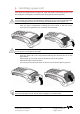
• Insert completely the MicroSD Card into the
slot marked (MicroSD) as indicated on the
figure.
Take care to ensure that the MicroSD Card is
inserted in the correct manner. The
insertion position Card is engraved on the
terminal.
• To remove the MicroSD Card push on it with
your finger nails.