
User Manual






Product name : iCT220/iCT250 • 12/21
Copyright © 2012 Ingenico
900002734 R11 000 05/4012
All rights reserved
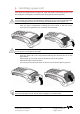
4.3.4. Close cover
• To close the cover, start by inserting the clips
1
of the cover in their housing
respectively first, as shown on the figure here below, and close the cover.
4.4. Installation of the Magic Box
ADVICE
It is strongly recommended to attach the “Magic cable” to terminal’s work area in
order to reduce stress on the terminal and connection.
Examples of securing the “Magic Cable” are as illustrated:
1
Using the supplied cable tie to attach to a table leg (or similar)
2
Using the supplied cable tie and self-adhesive support
3
Using a counter-sunk screw (not supplied) to an appropriate surface
• The “Magic Cable” should be readily accessible for support and terminal helpdesk
diagnosis purposes.
Note: The connection Magic Box can also be attached using a VELCRO™ or other system.
1
1 3
2