Digital Housing i n s t r u c t i o n m a n u a l for Sony DSC-V1 Housing #6110.
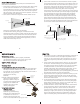
Ikelite Digital Housing i n s t r u c t i o n Strobe Mount Shutter Release m a n u a l Housing #6110.91 for Sony DSC-V1 Night Shot Night Frame Power Quick Release Button Lens Port Mode Dial Rubber Handles Lid Snap Tray FRONT VIEW External Strobe Connector Shutter Release O'ring Zoom Congratulations on your purchase of an Ikelite Digital Camera Housing. Ikelite has over 30 years of experience in the underwater photographic and lighting market.
Closing the Housing Checking Controls housing back 1. Place housing face down in your Once the housing has been closed, push the controls back into Shutter lap. place. Make sure they line up with the camera’s controls. Release 2. Check to see that there is an O'ring External o’ring on the housing back and Turn Camera On that it is clean and in its proper Strobe Connector Turn the camera on and operate each of the housing controls to location. Zoom get a feel for using the camera in the housing.
Lubricants 1. Ikelite provides silicone lubricant with the housing. We recommend that you use only Ikelite lubricant on Ikelite products as some other brands may cause the o’ring to swell and not seal properly. 2. Use only enough lubricant to lightly cover control shafts and o’rings. Wipe off any excess lubricant with a clean cloth. Lubricant is not a sealant, it is used to reduce friction. Excessive lubricant can collect sand and dirt which may interfere with proper sealing.
Control Maintenance Ikelite controls are designed to provide years of reliable service with minimal maintenance. 1. Push button controls require no maintenance other than rinsing in fresh water after saltwater use. If a push button control becomes difficult to push or if it sticks when depressed, soak the housing in luke warm fresh water. After a few minutes operate the push button. If this does not correct the problem, return the housing to Ikelite for maintenance. 2.
General Tips 1. Due to the power required to operate the camera, flash, and LCD screen it is a good idea to start each dive with a fresh batteries. 2. Some cameras reset their flash to AUTO when the camera is turned on. If you prefer another setting be sure to select it. 3. As soon as you enter the water, take a moment and check the housing to see that it is properly sealed. 4. Next, check to see if there are any bubbles on the face of the lens port. If there are, take your finger and remove them.