
Operation Manual


ENGLISH
OPERATING THE MONITOR 21
● Lock Mode
<OSD Menu>
1. The OSD lock will be activated by pressing the front buttons MENU and for about 10 seconds.
If you try to access the OSD by pressing any of the buttons MENU,
, and SELECT, message
"OSD Locked" will appear on the screen.
2. The OSD lock will be deactivated by pressing the front buttons MENU and
again for 10
seconds.
<Power Switch>
1. The power switch lock will be activated by pressing the front buttons MENU and for 10
seconds. Locking the power switch means that won't be able to turn off the Monitor while the
power switch is locked. If presses the power switch message "Power Button Locked" will appear
on the screen.
2. The power switch lock will be deactivated by pressing the front buttons MENU and
again for
about 10 seconds.
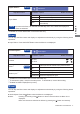
Disabled function matrix
After enabled function
Contrast Brightness
Adv.
Contrast
ECO
Mode
Overdrive Color
Blue Light
Reducer
Function
enabled
Adv. Contrast
ECO Mode
i-Style Color
Blue Light
Reducer
: adjustable
: disabled