
Operation Manual




ENGLISH
BEFORE YOU OPERATE THE MONITOR 7
Put the monitor on a stable surface. The monitor may cause injury or damage if it
falls or is dropped.
Do not give a strong impact to the monitor. It may cause damage.
Unplug the monitor before removal or installation to avoid electric shock or
damage.
CAUTION
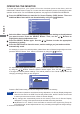
FITTING AND REMOVAL OF BASE : ProLite X2474HS / ProLite X2474HV
<Installation>
Put a piece of soft cloth on the table beforehand
to prevent the monitor from being scratched.
Lay the monitor flat on a table with front face
down.
Hold the monitor and push the Stand until it
clicks and is secure.
Hold the monitor and push the Stand-Base until
it clicks and is secure.
<Removal>
Put a piece of soft cloth on the table beforehand
to prevent the monitor from being scratched.
Lay the monitor flat on a table with front face
down.
Press and hold the hooks inside, and pull the
Stand-Base.
Press the hook and remove the Stand.
Hooks
Stand-Base
Stand
Hooks