
Operation Manual






ENGLISH
8 BEFORE YOU OPERATE THE MONITOR
CONTROLS AND CONNECTORS : MONITOR
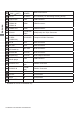
<Back Controller>
ENTER / VIDEO SOURCE Enter/Input Select Button
MENU Menu Button
Down Button
Up Button
/ - Left / - Button
/ + Right / + Button
Power Button
Power Indicator
Green Normal Operation
Red
Flash : Power Management
Lighting : If turn off the Power Button on the Remote
Control and the Back Controller.
Off Power Off
Remote Sensor Remote Sensor
Ambient Light Sensor
Detects ambient lighting conditions around the Monitor
and adjusts screen brightness automatically when the
Ambient Light Sensor function is activated.
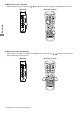
<Front>
ProLite LH4265S
ProLite TH4265MIS
<Back>