
Owner's Manual





ENGLISH
OPERATING THE MONITOR 13
Too weak
Too strong
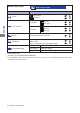
Adjustment Item Problem / Option Button to Press
Color Adjust
Color Adjust
User Color
You can skip the Menu items and display an adjustment scale directly by using the following button
operations.
i-Style Color: Press the
Button when the Menu is not displayed.
Direct
Direct
Bluish white
Red
Green
Blue
Cool
Reddish white Normal
Greenish white Warm
i-Style Color
Standard
For general windows environment and monitor
default setting.
Text
For text editing and viewing in a word processing
environment.
Game
For PC game environment.
Cinema
For movie and video environment.
Scenery For displaying outdoor scenery images
Information
Information
Information
H.Frequency:
V.Frequency:
Resolution:
Pixel Clock:
Model Number:
67.56KHz
60.0Hz
1920 x 1080
148.5MHz
PLE2273HDS
Exit
See your graphic card user guide for more information
about changing the resolution and refresh.
Displays information regarding the current input signal coming
from the graphic card in your computer.
NOTE