
Operation Manual





ENGLISH
11 OPERATING THE MONITOR
See your graphic card user guide for more information about
changing the resolution and refresh
NOTE
Adjustment Item Problem / Option Button to Press
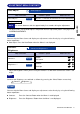
Color Adjust
Color Adjust
9300K
6500K Reddish white
Bluish white
5400K Greenish white
G (Green)
R (Red)
B (Blue)
Too weak
Too strong
User Color
2
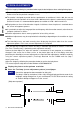
Information
Information
i
Displays information regarding the current input signal coming
from the graphic card in your computer.
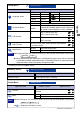
Adjustment Item Problem / Option Button to Press
Image Adjust
Image Adjust
H. / V. Position
Fine Tune
H.Size
Too far to the left
Too far to the right
Too low
Too high
H. Position
V. Position
H. Position and V. Position are switched as follows by pressing the Select Button successively.
H. Position V. Position
NOTE
Too narrow
Too wide
To correct flickering text or lines
Sharpness
Adjust the picture quality at resolutions of
less 1280 x 1024.
You can change the picture quality (4 steps).
H.Frequency:
V.Frequency:
Pixel Clock:
Resolution:
Model Number:
Serial No:
Information
1 : Exit
70.64 kHz
74.98 Hz
136.75 MHz
1440 x 900
PLE1900WS
0571060001001
Only Analog Input
Only Analog Input
Only Analog Input