
Manual





18
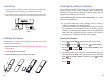
Choosing the Dialing Mode
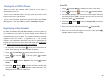
Setting Date & Time
Your phone can be set to pulse dialing (rotary), or tone dialing
(DTMF). To change the dialing mode:
Your phone can display the current date and time.
You must set the correct date and time to indicate when calls or
messages are received.
Press to display the main menu items.
Press to choose , then press .
Enter the current base PIN (the default is ) and press
.
Press to choose , then press
. The current setting appears.
Press or to choose or , then
press to confirm.
Menu
Select
0000
OK
Down Dial mode
Select
Left Right DTMF PULSE
Save
beneath
beneath
beneath
beneath
beneath
Press to display the main menu items.
Press to choose , then press .
Press to choose . The current
settings are displayed:
Using the keypad, enter the current date and time (four digits
for each, as explained below in the notes).
Press to save the setting.
Menu
Select
Select Set Clock
Select
beneath
beneath
beneath
beneath
1
1
2
2
3
3
4
5
4
5
Base
Date and time
47
Press to display the option menus.
Press or to choose the desired option:
-
-
-
Select
Up Down
Edit
Delete
Delete all
allows you to edit the selected entry.
deletes the selected entry.
deletes all of the contact entries.
beneath
3
4
Download Phonebook from the iPhone
Make sure that the iPhone is already connected to the DECT
phone with Bluetooth, and place your iPhone next to the
telephone base during the downloading.
Press beneath to display the main menu items.
Press beneath to choose , then press
or to choose or .
If available, press to choose , then press
beneath . The contacts from the iPhone is updated
on the DECT phone.
After that, you can review the iPhone's contacts via your
DECT phone.
Menu
Select Up
Down Cell 1 Cell 2
Down Update
Select
2
1
3
4
5
Contacts
Important Note:
Since the speed of Bluetooth transmission is limited, the
process of contacts downloading may last for several minutes.
If there is an incoming call when contacts downloading is in
progress, the downloading is terminated. You have to repeat
above operations.
Up to 2 cell phonebooks can be downloaded to your DECT
phone via Bluetooth wireless technology. Each downloaded
phonebook can store up to 500 entries. You can access any
phonebook entry and use it to make a call on the landline or
either of two iPhones.