
Manual





17
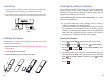
To extend radio coverage, a handset can be registered to up
to 4 different base units. A base can be used with up to 5
handsets, and one base can connect to only one handset at
a time.
Note:
Deactivating a Handset
If necessary, you can clear a handset’s registration, but you
cannot deactivate the handset that you are using.
Press to display the main menu items.
Press to choose , then press .
Enter the current base PIN (the default is ) and press
.
Press or to choose , then
press . " " appears. Use the
keypad to press the handset number for which you want to
clear the registration, then press . A confirm
tone occurs, and the handset cannot be used anymore with
the base.
Menu
Select
0000
OK
Up Down Release handset
Select H Desub ?
OK
beneath
beneath
beneath
beneath
beneath
1
2
3
4
Base
48
Chapter 7: Settings
Changing the Handset & Base PIN
Base and handset PINs are required to protect your phone
against unauthorized use. They are set to at the factory.
You can change the PINs as follows:
0000
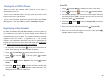
Press to display the main menu items.
Press to choose , then press .
Press to choose .
Enter the current PIN code, then press .
Enter the new four-digit PIN, and press .
Enter the new PIN code again to confirm it, then press
to save the setting.
Menu
Select
Select PIN code
OK
OK
OK
beneath
beneath
beneath
beneath
beneath
beneath
1
2
3
4
5
6
Handset PIN
At step 4, if you enter the wrong PIN, your phone generates
a warning sound.
Note:
Handset
Press to confirm. The display asks you
to enter the AC (the authentication code is ). Enter this
code and press .
If the registration is successful, a confirm tone occurs and
the new handset shows the handset number (e.g. ).
Select
0000
Select
1
beneath
beneath
6
7