
Manual





11
Select Keys
Press the left or right button to initiate the function
shown above it, on the display.
Back
Cancel
Pause
Select
Option
Redial
Left:
Right:
Save
Remote
Menu
OK
List options during a call.
Option
Enter the remote control for music mode.
Remote
Redial the last-dialed number.
Redial
Enter the main menu:
Select the highlighted menu item.
Save a contact number.
Select
Save
Insert a pause while dialing a number.
Pause
Return to the previous menu.
Cancel your setting.
Back
Cancel
Menu
Clear digits or characters.
Delete
OK
Confirm a selection.
Delete
54
Flash Time
During a conversation, allows you to access special services
offered by your telephone network or to transfer a call to
another extension if you are connected to a PABX (Private
Automatic Branch of eXchange).
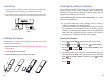
If your key does not work properly, you need to adjust the
Flash time, as follows:
Press to display the main menu items.
Press to choose , then press .
You are prompted to enter the current base PIN code (the
default PIN is ). Use the numeric keys to enter and
press .
Press to access . The current
setting appears.
Press or to choose the desired flash time,
then press . You can choose from 100ms,
120ms, 300ms or 600ms.
Menu
Select
0000
OK
Select Flash time
Left Right
Save
beneath
beneath
beneath
beneath
beneath
1
2
3
4
5
Base
Version Information
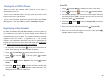
Press to display the main menu items.
Press to choose , then press .
Press or to choose , then press
. The current Handset model number,
Hardware version, HS EMC code and Software version
information appear.
Menu
Select
Up Down Version Info
Select
beneath
beneath
beneath
1
2
3
Handset