
Instruction Manual






8
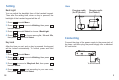
Bluetooth Handset Overview
Handset
1. Charging LED
2. LCD screen
3. Up key
4. Music control key
5. Reject/Power key
6. Numeric keypad
7. Down key
1
2
3
4
5
6
7
8
9
10
11
12
13
8. Dial/Answer key
9. Left/Right keys
10. Earpiece
11. Multi-Function Button (MFB)
12. Microphone
13. Charging pins
14. Headset jack
15. Reset jack
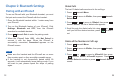
Avoid Loss
Language
Press beneath .
Press or to move to , then press
beneath .
Press or to move to , then press
beneath .
Press or to select or , then
press beneath .
Menu
4Setting
Select
3AvoidLoss
Select
1Enable 2Disable
Select
Press beneath .
Press or to move to , then press
beneath .
Press or to move to , then press
beneath .
Press or to select or , then
press beneath .
Menu
4Setting
Select
4Language
Select
1English 2
Select
After this function is enabled, once your iPhone5 and i-501
are keep away from the Bluetooth's effective range, i-501
will ring continuous even in silence mode.
You can change the language used to display the menu
messages. There are two languages available.
1
1
2
2
3
3
4
4
29
14
15