
Instruction Manual






Dialed Calls
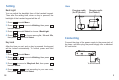
Press beneath .
Press to move to , then press beneath
.
Press or to move to , then press
beneath . The list of dialed calls appears.
Scroll through the dialed calls list using or
until you find the desired number, press to dial it
out.
Menu
2Caller
Select
3Dialed
Select
1
2
3
4
Delete all the Numbers in Call Logs
Press beneath .
Press to move to , then press beneath
.
Press or to move to , then press
beneath . appears. Press
beneath to confirm or press beneath to
cancel.
Menu
2Caller
Select
4ClearAll
Select IsClearAll
Select Exit
1
2
3
The last 10 dialed calls are stored in the call logs.
12
Chapter 2: Bluetooth Settings
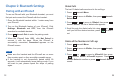
Pairing with an iPhone5
To use an iPhone5 with your Bluetooth handset, you must
first pair and connect the iPhone5 with the handset.
Place the Bluetooth handset within 1 meter away from
your iPhone5.
Turn on the Bluetooth feature of your iPhone5. Click
, and , then the iPhone5
searches for available devices.
Press beneath to enter the pairing mode.
When the iPhone5 finds , click to
connect it with the base. When the iPhone5 is
successfully connected, appears on the
iPhone5 screen.
Settings Bluetooth OFF
Pair
i-501 Not Paired
Connected
1
2
3
4
Notes:
Make sure the handset and the iPhone5 are no more
than a meter apart, so they are within operable range.
If the handset is not successfully paired within
u
still want to pair, please repeat the steps of pairing
again.
90
seconds, it will automatically leave pairing mode. If yo
25