
User Manual


Table Of Contents
- Front cover
- IMPORTANT
- FEATURES
- EXPLICIT DEFINITIONS
- IN CASE OF EMERGENCY
- PRECAUTIONS
- RECOMMENDATION
- INFORMATION
- DISPOSAL
- COUNTRY CODE LIST
- TABLE OF CONTENTS
- 1. OPERATING RULES
- 2. SUPPLIED ACCESSORIES AND ATTACHMENTS
- 3. PANEL DESCRIPTION
- 4. PREPARATIONS
- 5. BASIC OPERATIONS
- 6. SCAN
- 7. DUALWATCH/TRI-WATCH
- 8. DSC OPERATION
- 9. OTHER FUNCTIONS
- 10. MENU SCREEN
- 11. BATTERY CHARGING
- 12. OPTIONAL SPEAKER MICROPHONE
- 13. TROUBLESHOOTING
- 14. SPECIFICATIONS AND OPTIONS
- 15. CHANNEL LIST
- 16. SAFETY TRAINING INFORMATION
- INDEX
- Back cover
35
8
DSC OPERATION
New2001
■ Receiving DSC calls (other)
The transceiver receives the following types of DSC calls.
• Individual call (p. 35)
• Individual Acknowledgement call (p. 25)
• Group call (p. 36)
• All Ships call (p. 37)
• Position Request call (p. 38)
• Test call (p. 39)
• Test Acknowledgement call (p. 40)
D Receiving an Individual call
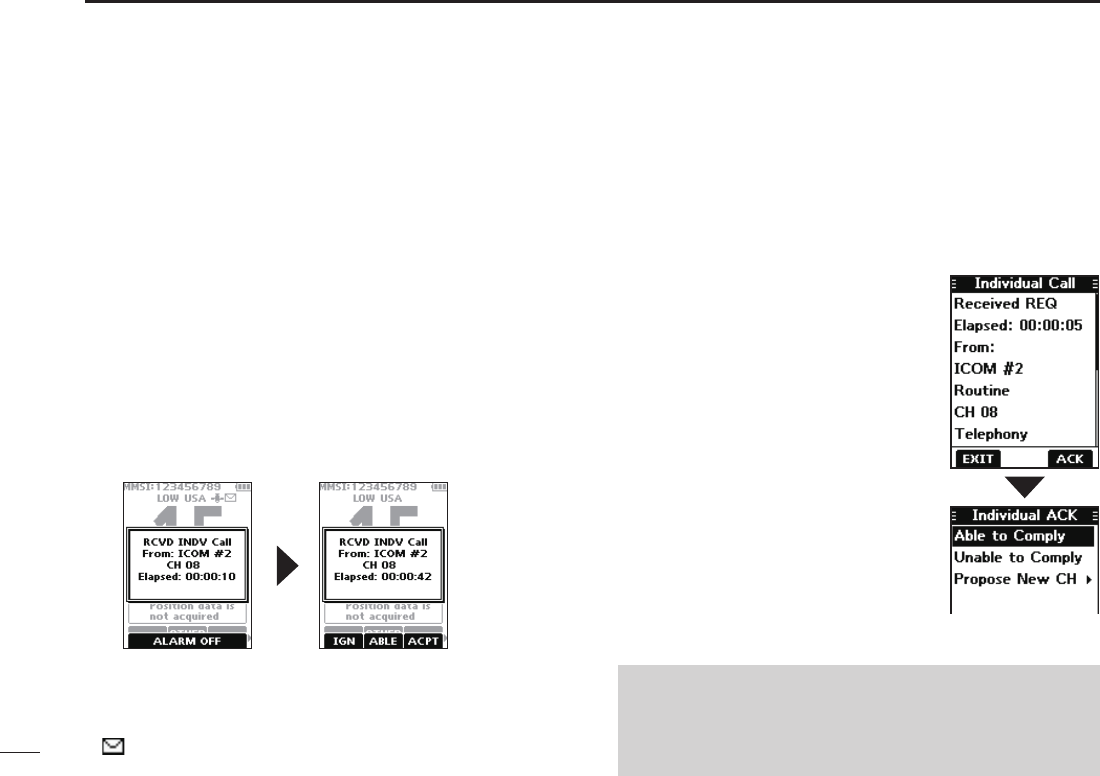
When an Individual call is received:
• The alarm sounds.
• “RCVD INDV Call” is displayed.
1. Push any software key to turn OFF the alarm.
2. Push the software key below the next operation.
[IGN]
• Ignores the call and returns to the operating screen.
• The call is saved in the DSC Log.
• “
” blinks continuously until you display the call message.
[ACPT]
• Accepts the call.
• The assigned channel is automatically
selected.
• The call is saved in the DSC Log.
• The received call’s information is
displayed.
• Push the software key below [ACK] to
select the Acknowledgement option.
Able to Comply:
Sends an Acknowledgement call without
any changes.
Unable to Comply:
Sends an Acknowledgement but you
cannot communicate.
Propose New CH:
Sends an Acknowledgement call but on
another channel. Assign the channel by
pushing [▲] or [▼].
[ABLE]
• Sends an Individual Acknowledgement call right away.
• The assigned channel is automatically selected.
• After sending, [RESEND] to resend.
• The call is saved in the DSC Log.
NOTE: If the Auto ACK function is set to “Auto (Unable)”
the Acknowledgement “Unable to Comply” is automatically
sent to the calling station when the call is received. (p. 42)
L For the USA and Export versions, this function is set to
“Auto (Unable)” by default.