
Specifications




28
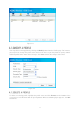
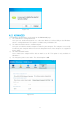
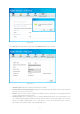
Encryption Type: The encryption type here is set to be AES.
Security Key: Enter the Key in the field to make your AP security enabled (for example
123456789). Only by entering the corresponding key can other computers establish a
successful connection with your AP.
IP Address: Here displays the IP address of the SoftAP.
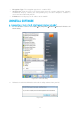
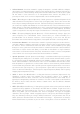
1. On the Windows taskbar, click StartAll programsWirelessUninstall Wireless N
Client Utility.
Figure 6-1 Uninstall Utility
2. Follow the Install Shield Wizard to uninstall the utility software from your PC.
Figure 6-2