
user manual


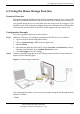


Table Of Contents
- About This Document
- 1 Safety Precautions
- 2 Product Overview
- 3 Quick Start
- 4 Configuring the WAN Interface
- 5 Configuration of WLAN
- 6 Configuring Frequently Used Functions
- 7 Maintenance Guide
- 8 FAQs

6 Configuring Frequently Used Functions
6-6 Huawei Proprietary and Confidential
Copyright © Huawei Technologies Co., Ltd.
6.4 Using the USB Printer Function
To enable the USB printer function, do as follows.
Step 1
Connect the cables refer to
Figure 6-5.
Figure 6-5 USB printer connection
Step 2
Configure the w
eb page as follows:
Launch the Internet Explorer on your computer and enter http://192.168.1.1 in the
address bar.
1.
2.
3.
4.
5.
6.
1.
2.
Enter the user name and the password in the displayed window, and then click OK.
Choose Advanced Setup > Printer S
erver in the navigation tree.
Enable the Enable on-board print server option tex
t box.
Enter the printer name and the model of your printer in the Printer name and Make
and model text boxes.
Click Save/Apply to save the settings.
Step 3
Set the printer parameters on the PC.
Choose Start
> Printers and Faxes. Then click the Add Printer icon on the left side
of the displayed page.
Click Next in the Welcome to the Add Printer Wizard page.