
User Guide



Table Of Contents
- Getting to know your MateBook X Pro
- Initial setup
- Getting started
- Charging your MateBook X Pro
- Features
- One-touch log in. Password free
- HUAWEI MateDock 2
- Safety information
- Electronic device
- Interference with medical equipment
- Protecting your hearing when using a headset
- Areas with flammables and explosives
- Traffic security
- Operating environment
- Child's safety
- Accessories
- Charger safety
- Battery safety
- Cleaning and maintenance
- Environmental protection
- Disposal and recycling information
- Reduction of hazardous substances
- EU regulatory conformance
- Frequency Bands and Power
- Accessories and Software Information
- ErP Product Information
- FCC Regulatory Compliance
- Industry Canada compliance
- Personal Information and Data Security
- Legal Notice
5
Charging your MateBook X Pro
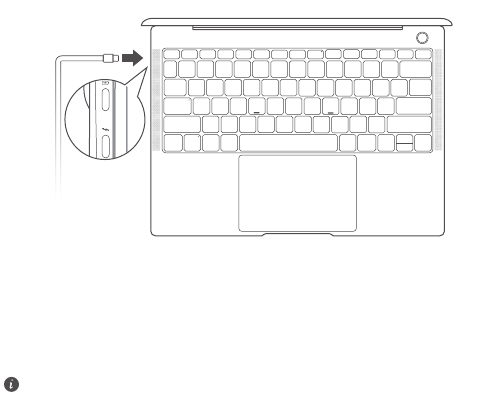
Your MateBook X Pro is pre-installed with an irremovable, rechargeable battery. You can
charge your MateBook X Pro with the adapter and USB-C charging cable that comes with
it. The battery is sufficiently charged when the charging indicator stays steady white.
•
The indicator blinks white when the battery level is low or medium.
•
The indicator stays steady white when the battery level is high.
• You can charge your MateBook X Pro, transfer data, and use DisplayPort with the
two USB-C ports on the left side.
• The Thunderbolt™ USB-C port provides a faster transfer speed. Your Thunderbolt
USB device is only compatible with the Thunderbolt port. It is recommended that
you use the port with an adapter.