
MateBook 16s User Guide-(CREF-X,Windows11_01,en-gb)
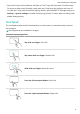
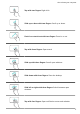
Table Of Contents
- Contents
- Get to know your computer
- Start the computer
- F10 factory reset (not available in some regions)
- Eye Comfort mode
- Accessories and extensions
- Safety information
- Electronic device
- Interference with medical equipment
- Protecting your hearing when using a headset
- Areas with flammables and explosives
- Traffic safety
- Operating environment
- Child's safety
- Accessories
- Charger safety
- Battery safety
- Cleaning and maintenance
- Disposal and recycling information
- Reduction of hazardous substances
- Personal Information and Data Security
- Legal Notice
- Copyright © Huawei 2022. All rights reserved.
- Trademarks and Permissions
- Notice
- Third-Party Software Statement
- DISCLAIMER
- Import and Export Regulations
- Privacy Policy
- For More Help
- ALL PICTURES AND ILLUSTRATIONS IN THIS GUIDE, INCLUDING BUT NOT LIMITED TO THE DEVICE COLOUR, SIZE, AND DISPLAY CONTENT, ARE FOR YOUR REFERENCE ONLY. THE ACTUAL DEVICE MAY VARY. NOTHING IN THIS GUIDE CONSTITUTES A WARRANTY OF ANY KIND, EXPRESS OR IMPLIED.

Tap with two ngers: Right-click.
Slide up or down with two ngers: Scroll up or down.
Pinch in or stretch out with two ngers: Zoom in or out.
Tap with three ngers: Open search.
Slide up with three ngers: See all open windows.
Slide down with three ngers: Show the desktop.
Slide left or right with three ngers: Switch between open
windows.
Tap with four ngers: Open notication centre and calendar.
Get to know your computer
5