
Manual


Getting started
15
2. Touch to select an input method.
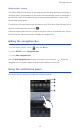
To change your phone's default input method, touch on the home
screen. Then touch the
All
tab. Under
PERSONAL
, touch
Language & input
>
Default
to select an input method.
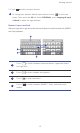
Huawei input method
Slide your finger left or right across the onscreen keyboard to switch between the QWERTY
and 9-key keyboards.
Touch to switch between lowercase letters, uppercase letters,
and caps lock.
Touch to enter numbers and symbols.
Touch to enter emoticons.
Touch to switch between QWERTY, 9-key, and other input
modes.
4
1
2
3
1
A
2
*#12
3
4