
- Hewlett-Packard Server User Manual



Installation
Installation Defaults
Chapter 2 29
Installation Defaults
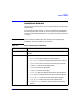
The HP-UX AAA Server can be run as root user, however non-root user is
recommended.
A user and group, both named aaa, will be created during installation.
The HP-UX AAA Server can be run as non-root user, using the default
aaa user created during installation, or any other user who is part of the
aaa group.
IMPORTANT Do not remove the default login aaa and group aaa created during
installation, even if you prefer not to use them.
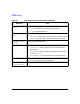
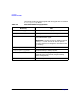
Table 2-1 File Locations Upon Installation
Directory File
/opt/aaa/aatv Server modules and plug-ins. The directory where the Actions are
placed.
/opt/aaa/bin Server daemons and utilities:
• db_srv: Oracle client daemon for authentication
• las.test.sh: script to create simulated sessions for testing
• radcheck: AAA Server test utility (like the ping command)
• raddbginc: controls server debug output
• radiusd: AAA Server executable
• radpwtst: AAA test client utility
• radrecord: reads and displays AAA Server session log files
• sesstab: print contents of the AAA Server session table file
• start_db_srv: script to start the Oracle client daemon
• stop_db_srv: script to stop the Oracle client daemon
• stopsession.sh: a script to manually stop an accounting
session