
Services WAN Accelerator User guide



40 CONFIGURING THE HP EFS WAN ACCELERATOR
To modify NFS server
settings
1. Click the Setup tab to expand the Optimization Service menu.
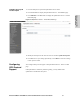
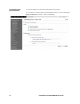
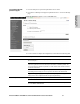
2. Click Protocol: NFS to display the Optimization Service - Protocol: NFS page.
3. Click the server name in the NFS Server list to display the Optimization Service -
Protocol: NFS Server <server name> page.
Figure 2-8. Optimization Service - Protocol: NFS Server <server name> Page