
User guide


40 Connecting hosts
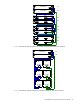
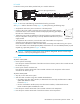
Two servers/one HBA per server/dual path
Connecting switch attach configurations
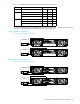
Dual controller configuration
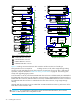
Two servers/two switches
Connecting remote management hosts
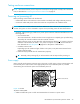
The management host directly manages systems out-of-band over an Ethernet network.
1. Connect an RJ-45 Ethernet cable to the network management port on each P2000 G3 MSA System
controller.
2. Connect the other end of each Ethernet cable to a network that your management host can access
(preferably on the same subnet).
NOTE: Connections to this device must be made with shielded cables – grounded at both ends – with
metallic RFI/EMI connector hoods, in order to maintain compliance with FCC Rules and Regulations.
6Gb/s
6Gb/s
6Gb/s
6Gb/s
Server 1
Server 2
Server 1
Server 2
6Gb/s
6Gb/s
If using FC host ports instead of the iSCSI ports shown, then connect cables from
each switch to the relevant FC port, instead of the iSCSI port.
Server 1
Server 2
Switch A
Switch B