
Mellanox MLNX-OS® User Manualfor SX1018HP Ethernet Managed Blade Switch

Rev 1.6.9
Mellanox Technologies
87
Mellanox Technologies Confidential
5.11.2 Statistical Samples
The sFlow agent samples interface counters time based. Polling interval is configurable to any
value between 5-3600 seconds with the default being 20 seconds.
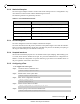
The following statistics are gathered by the CPU:
Table 31 - List of Statistical Counters
Counter Description
Total packets The number of packets that pass through sFlow-enabled ports.
Number of flow samples The number of packets that are captured by the
sampling mecha-
nism.
Number of statistic samples The number of statistical samples.
Number of discarded samples The number of samples that were discarded.
Number of datagrams The number of datagrams that were sent to
the collector.
5.11.3 sFlow Datagrams
The sFlow datagrams contain flow samples and statistical samples.
The sFlow mechanism uses IP protocol, therefore if the packet length is more than the
interface
MTU, it becomes fragmented by the IP stack. The MTU may also be set manually to anything in
the range of 200-9216 bytes. The default is 1400 bytes.
5.11.4 Sampled Interfaces
sFlow must be enabled on physical or LAG interfaces that require sampling. When adding a port
to a LAG, sFlow must be disabled on the port. If a port with enabled sFlow is configured to be
added to a LAG, the configuration is rejected. Removing a port from a LAG disables sFlow on
the port regardless of the LAG’s sFlow status.
5.11.5 Configuring sFlow
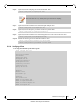
To configure the sFlow agent:
Step 1. Unlock the sFlow commands. Run:
Step 2. Enable sFlow on the system. Run:
Step 3. Enter sFlow configuration mode. Run:
Step 4. Set the central collector’s IP. Run:
Step 5. Set the agent-ip used in the sFlow header. Run:
switch (config) # protocol sflow
switch (config) # sflow enable
switch (config) # sflow
switch (config sflow) #
switch (config sflow) # collector-ip 10.10.10.10
switch (config sflow) # agent-ip 20.20.20.20