
Mellanox MLNX-OS® User Manualfor SX1018HP Ethernet Managed Blade Switch



Rev 1.6.9
Mellanox Technologies
78
Mellanox Technologies Confidential
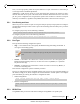
Step 1. Log in as admin.
Step 2. Enter config mode. Run:
Step 3. Run the command
dcb ets disable
.
To configure the WRR bandwidth percentage:
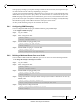
Step 1. Log in as admin.
Step 2. Enter config mode. Run:
Step 3. Make sure ETS feature is enabled. Run:
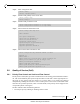
Step 4. Choose the WRR bandwidth rate and distribution.
By default the WRR distribution function is equal 25% per TC. Changing the WRR bandwidth
rate will cause a change in the distribution function, for example if you wish to schedule more
traffic on TC-0, TC-1, TC-2 while reducing the amount of traffic sent on TC-3, run the com-
mand
dcb ets tc bandwidth
.
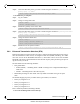
switch > enable
switch # configure terminal
switch (config) # no dcb ets enable
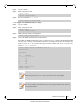
switch > enable
switch # configure terminal
switch (config) # dcb ets enable
switch (config) # dcb ets tc bandwidth 30 30 30 10
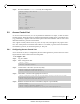
# show dcb ets
ETS enabled
TC Bandwidth
--------------------------
0 30%
1 30%
2 30%
3 10%
Number of Traffic Class: 4
switch (config) #
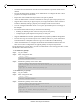
Traffic class priorities are <0-3>, where 0 is the lowest and 3 is the highest.
The sum of all traffic class bandwidth value (in percentage) should be 100, otherwise
the command will fail.