
Mellanox MLNX-OS® User Manualfor SX1018HP Ethernet Managed Blade Switch



Rev 1.6.9
Mellanox Technologies
74
Mellanox Technologies Confidential
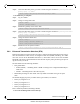
Step 6. Define the MRouter port on the VLAN. Run:
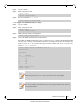
To change the Interface Switchport to Hybrid:
Step 1. Log in as admin.
Step 2. Enter config mode. Run:
Step 3. Enable IGMP snooping globally. Run:
Step 4. Create a VLAN. Run:
Step 5. Change back to config mode. Run:
Step 6. Change the interface switchport mode of the port (the interface is member of VLAN 1 by
default). Run:
Step 7. Attach the VLAN to the port’s interface. Run:
Step 8. Change to config mode again. Run:
Step 9. Define the MRouter port on the VLAN. Run:
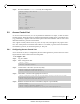
5.7 Link Layer Discovery Protocol (LLDP)
The Link Layer Discovery Protocol (LLDP) is a vendor-neutral Link Layer protocol in the Inter-
net Protocol Suite used by network devices for advertising their identity, capabilities, and neigh-
bors on a IEEE 802 LAN. The protocol is formally defined in IEEE 802.1AB.
5.7.1 Configuring LLDP
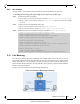
To configure the LLDP on the switch:
Step 1. Log in as admin.
switch (config) # vlan 2
switch (config vlan 2) # ip igmp mrouter interface ethernet 1/1
switch (config vlan 2) #
switch > enable
switch # configure terminal
switch (config) # ip igmp snooping
switch (config) #
switch (config) # vlan 200
switch (config vlan 200) #
switch (config vlan 200) # exit
switch (config) #
switch (config) # interface ethernet 1/36
switch (config interface ethernet 1/36) # switchport mode hybrid
switch (config interface ethernet 1/36) # switchport mode hybrid allowed-vlan 200
switch (config interface ethernet 1/36) #
switch (config interface ethernet 1/36) # exit
switch (config) #
switch (config) # vlan 200
switch (config vlan 200) # ip igmp mrouter interface ethernet 1/36
switch (config vlan 200) #