
Mellanox MLNX-OS® User Manualfor SX1018HP Ethernet Managed Blade Switch



Rev 1.6.9
Mellanox Technologies
73
Mellanox Technologies Confidential
ticast-group by sending a join request message towards the network router, and responds to que-
ries sent from the network router by dispatching a join report.
A given port can be either manually configured to be a router-port or it can be dynamically man-
ifested when having received a query, hence, the network router is connected to this port. All
IGMP Snooping Control packets received from hosts (joins / leaves) are forwarded to the router-
port, and the router-port will update its multicast-group data-base accordingly. Each dynamically
learnt multicast group will be added to all of the router-ports on the switch.
As many as 5K multicast groups can be created on the switch.
5.6.1 Configuring IGMP Snooping
You can configure IGMP snooping to establish multicast group memberships.
To configure IGMP snooping:
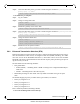
Step 1. Log in as admin.
Step 2. Enter config mode. Run:
Step 3. Enable IGMP snooping globally. Run:
Step 4. Enable IGMP snooping on a VLAN. Run:
5.6.2 Defining a Multicast Router Port on a VLAN
You can define a Multicast Router (MRouter) port on a VLAN in one of the following methods:
To change the Interface Switchport to Trunk:
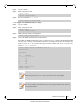
Step 1. Log in as admin.
Step 2. Enter config mode. Run:
Step 3. Enable IGMP snooping globally. Run:
Step 4. Change the interface switchport mode of the port (the interface is member of VLAN 1 by
default). Run:
Step 5. Change back to config mode. Run:
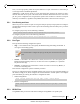
switch > enable
switch # configure terminal
switch (config) # ip igmp snooping
switch (config) #
switch (config) # vlan 2
switch (config vlan 2) # ip igmp snooping
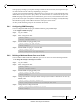
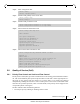
switch > enable
switch # configure terminal
switch (config) # ip igmp snooping
switch (config) #
switch (config) # interface ethernet 1/1
switch (config interface ethernet 1/1) # switchport mode trunk
switch (config interface ethernet 1/1) # exit
switch (config) #