
Mellanox MLNX-OS® User Manualfor SX1018HP Ethernet Managed Blade Switch

Rev 1.6.9
Mellanox Technologies
70
Mellanox Technologies Confidential
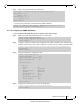
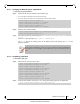
Step 4. Change back to config mode. Run:
Step 5. Enter the interface context. Run:
Step 6. From within the interface context, configure the interface mode to Hybrid. Run:
Step 7. From within the interface context, configure the allowed VLAN membership. Run:
Step 8. Change to config mode again. Run:
5.4 MAC Address Table
5.4.1 Configuring Unicast Static MAC Address
You can configure static MAC addresses for unicast traffic. This feature improves security and
reduces unknown unicast flooding.
To configure Unicast Static MAC address:
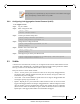
Step 1. Log in as admin.
Step 2. Enter config mode. Run:
Step 3. Run the command
mac-address-table static unicast <destination mac address> vlan <vlan
identifier(1-4094)> interface ethernet <slot>/ <port>
.
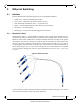
5.5 Spanning Tree
The operation of Rapid Spanning Tree Protocol (RSTP) provides for rapid recovery of connectiv-
ity following the failure of a bridge/bridge port or a LAN. The RSTP component avoids this
delay by calculating an alternate root port, and immediately switching over to the alternate port if
the root port becomes unavailable. Thus, using RSTP, the switch immediately brings the alternate
port to forwarding state, without the delays caused by the listening and learning states. The RSTP
component conforms to IEEE standard 802.1D 2004.
RSTP enhancements is a set of functions added to increase the volume of RSTP in Mellanox
switches. It adds a set of capabilities related to the behavior of ports in different segments of the
network. For example: the required behavior of a port connected to a non-switch entity, such as
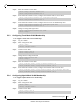
switch (config vlan 10) # exit
switch (config) #
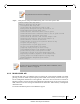
switch (config) # interface ethernet 1/35
switch (config interface ethernet 1/35) #
switch (config interface ethernet 1/35) # switchport mode hybrid
switch (config interface ethernet 1/35) #
switch (config interface ethernet 1/35) # switchport hybrid allowed-vlan add 10
switch (config interface ethernet 1/35) #
switch (config interface ethernet 1/35) # exit
switch (config) #
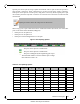
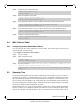
switch > enable
switch # configure terminal
switch (config) # mac-address-table static unicast 00:11:22:33:44:55 vlan 1 interface
ethernet 0/1