
Mellanox MLNX-OS® User Manualfor SX1018HP Ethernet Managed Blade Switch

Rev 1.6.9
Mellanox Technologies
68
Mellanox Technologies Confidential
• Trunk – Trunk port is a port connecting 2 switches. It accepts only tagged frames with
VLANs of which the port is a member. On egress, traffic sent from the Trunk port is
tagged. By default, a Trunk port is, automatically, a member on all current VLANs.
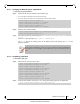
5.3.1 Configuring Access Mode and Assigning Port VLAN ID (PVID)
To configure Access mode and assign PVID to interfaces:
Step 1. Log in as admin.
Step 2. Enter config mode. Run:
Step 3. Create a VLAN. Run:
Step 4. Change back to config mode. Run:
Step 5. Enter the interface context. Run:
Step 6. From within the interface context, configure the interface mode to Access. Run:
Step 7. From within the interface context, configure the Access VLAN membership. Run:
Step 8. Change back to config mode. Run:
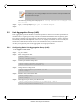
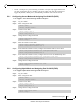
5.3.2 Configuring Hybrid Mode and Assigning Port VLAN ID (PVID)
To configure Hybrid mode and assign PVID to interfaces:
Step 1. Log in as admin.
Step 2. Enter config mode. Run:
Step 3. Create a VLAN. Run:
Step 4. Change back to config mode. Run:
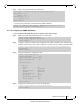
switch > enable
switch # configure terminal
switch (config) # vlan 6
switch (config vlan 6) #
switch (config vlan 6) # exit
switch (config) #
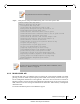
switch (config) # interface ethernet 1/36
switch (config interface ethernet 1/36) #
switch (config interface ethernet 1/36) # switchport mode access
switch (config interface ethernet 1/36) #
switch (config interface ethernet 1/36) # switchport access vlan 6
switch (config interface ethernet 1/36) #
switch (config interface ethernet 1/36) # exit
switch (config) #
switch > enable
switch # configure terminal
switch (config) # vlan 6
switch (config vlan 6) #
switch (config vlan 6) # exit
switch (config) #