
Mellanox MLNX-OS® User Manualfor SX1018HP Ethernet Managed Blade Switch

Rev 1.6.9
Mellanox Technologies
66
Mellanox Technologies Confidential
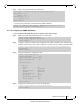
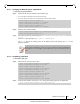
The following warning will be displayed:
The following interfaces will be unmapped: 1/4/1 1/
4/2 1/4/3 1/4/4
.
Step 3. Type
yes
when prompted
Type 'yes' to confirm unsplit
.
Step 4.
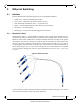
5.2 Link Aggregation Group (LAG)
Link Aggregation protocol describes a network operation in which several same speed links are
combined into a single logical entity with the accumulated bandwidth of the originating ports.
LAG groups exchange Lag Aggregation Control Protocol (LACP) packets in order to align the
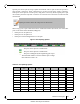
functionality between both endpoints of the LAG. To equally send traffic on all LAG links, the
switch uses a hash function which can use a set of attributes as key to the hash function.
As many as 16 physical ports can be aggregated on a single port-channel.
5.2.1 Configuring Static Link Aggregation Group (LAG)
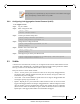
To configure a static LAG:
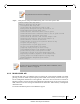
Step 1. Log in as admin.
Step 2. Enter config mode. Run:
Step 3. Create a port-channel entity. Run:
Step 4. Change back to config mode.
Step 5. Enable LACP in the switch. Run:
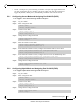
Step 6. Add a physical port to the port-channel. Run:
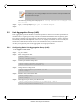
The module-type can be changed only from the first member of the split and not from
the interface that was split.
switch > enable
switch # configure terminal
switch (config) # interface port-channel 1
switch (config interface port-channel 1) #
switch (config interface port-channel 1) # exit
switch (config) #
switch (config) # lacp
switch (config) #
switch (config interface ethernet 1/4) # channel-group 1 mode on
switch (config interface ethernet 1/4) #