
Mellanox MLNX-OS® User Manualfor SX1018HP Ethernet Managed Blade Switch

Rev 1.6.9
Mellanox Technologies
65
Mellanox Technologies Confidential
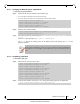
5.1.1.1 Changing the Module Type to a Split Mode
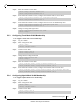
To split a port of an interface:
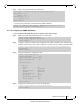
Step 1. Shut down all the ports related to the interface. Run:
• in case of split-2, shut down the current interface only
• in case of split-4, shut down the current interface and the other interface
Step 2.
Split the ports as desired. Run:
Step 3. The following warning will be displayed:
the following interfaces will be unmapped:
1/4 1/1
.
Choose
Yes
when prompted
Type 'yes' to confirm split
The
<ports>
field in the warning refers to the affected ports from splitting port
<inf>
in the
applied command.
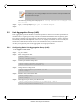
5.1.1.2 Unsplitting a Split Port
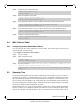
To unsplit a split port:
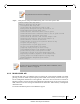
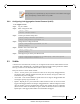
Step 1. Shut down all of the split ports. Run:
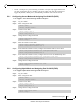
Step 2. From the first member of the split (1/4/1), change the module-type back to QSFP. Run:
switch (config) # interface ethernet 1/1
switch (config interface ethernet 1/1) # shutdown
switch (config interface ethernet 1/1) # exit
switch (config) # interface ethernet 1/4
switch (config interface ethernet 1/4) # shutdown
switch (config interface ethernet 1/4) # module-type qsfp-split-4
switch (config interface ethernet 1/4) #
Please beware that splitting a port into 4 prevents you from accessing the splittable port,
and additional one. For example, in the procedure above, ports 3 and 4 become unacces-
sible.
switch (config interface ethernet 1/4/4) # shutdown
switch (config interface ethernet 1/4/4) # exit
switch (config) # interface ethernet 1/4/3
switch (config interface ethernet 1/4/3) # shutdown
switch (config interface ethernet 1/4/3) # exit
switch (config) # interface ethernet 1/4/2
switch (config interface ethernet 1/4/2) # shutdown
switch (config interface ethernet 1/4/2) # exit
switch (config) # interface ethernet 1/4/1
switch (config interface ethernet 1/4/1) # shutdown
switch (config interface ethernet 1/4/1) # module-type qsfp