
Mellanox MLNX-OS® User Manualfor SX1018HP Ethernet Managed Blade Switch

Rev 1.6.9
Mellanox Technologies
61
Mellanox Technologies Confidential
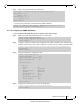
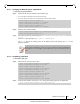
Step 3. Enter privacy password and its confirmation.
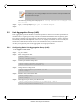
To retrieve the system table, run the following SNMP command:
snmpwalk -v3 -l authPriv -a MD5 -u admin -A “<Authentication password>” -x DES -X
“<privacy password>” <system ip> SNMPv2-MIB::system
4.11.1.6 Configuring an SNMP Notification
To set up the SNMP Notification (traps or informs) follow the next steps
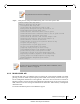
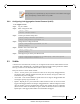
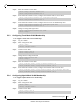
Step 1. Make sure SNMP and SNMP notification are enable. Run:
Step 2. Configure SNMP host with the desired arguments (IP Address, SNMP version, authentication
methods). More than one host can be configured. Each host may have different attributes. Run:
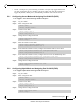
Step 3. Verify the SNMP host configuration. Run:
Step 4. Configure the desired event to be sent via SNMP. Run:
switch (config) # snmp-server user admin v3 prompt auth md5 priv des
Auth password: ********
Confirm: ********
Privacy password: ********
Confirm: ********
switch (config) #
switch (config) # snmp-server enable
switch (config) # snmp-server enable notify
switch (config) #
switch (config) # snmp-server host 10.134.47.3 traps version 3 user my-username auth
sha my-password
switch (config) #
switch (config) # show snmp host
Notifications enabled: yes
Default notification community: public
Default notification port: 162
Notification sinks:
10.134.47.3
Enabled: yes
Port: 162 (default)
Notification type: SNMP v3 trap
Username: my-username
Authentication type: sha
Privacy type: aes-128
Authentication password: (set)
Privacy password: (set)
switch (config) #
switch (config) # snmp-server notify event interface-up
switch (config) #