
Mellanox MLNX-OS® User Manualfor SX1018HP Ethernet Managed Blade Switch


Rev 1.6.9
Mellanox Technologies
60
Mellanox Technologies Confidential
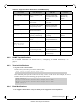
For additional information refer to MELLANOX-EFM-MIB.
4.11.1.4 Configuring SNMP
T
o set up the SNMP:
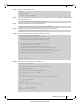
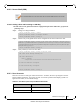
Step 1. Activate the SNMP server on the MLNX-OS switch (in configure mode) using the following
commands:
4.11.1.5 Configuring an SNMPv3 User
T
o configure SNMP V3 user:
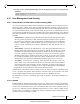
Step 1. Configure the user using the command:
where
• user role - admin
• auth type - md5 or sha
• priv type - des or aes-128
Step 2. Enter authentication password and its confirmation.
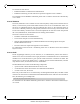
For event-to-MIB mapping, please refer to Table 22, “Supported Event Notifications
and MIB Mapping,” on page 50.
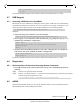
Community strings are case sensitive.
Director switches (SX65xx systems) require SNMP timeout configuration on the agent
of 60 seconds.
switch (config) # snmp-server enable
switch (config) # snmp-server enable notify
switch (config) # snmp-server community public ro
switch (config) # snmp-server contact "contact name"
switch (config) # snmp-server host <host IP address> traps version 2c public
switch (config) # snmp-server location "location name"
switch (config) # snmp-server user admin v3 enable
switch (config) # snmp-server user admin v3 prompt auth md5 priv des
switch (config) # snmp-server user [role] v3 prompt auth <hash type> priv <privacy
type>