
Mellanox MLNX-OS® User Manualfor SX1018HP Ethernet Managed Blade Switch


Rev 1.6.9
Mellanox Technologies
56
Mellanox Technologies Confidential
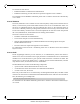
4.10.2 Secure Shell (SSH)
4.10.2.1 Adding a Host and Providing an SSH Key
T
o add entries to the global known-hosts configuration file and its SSH value, perform the
following steps:
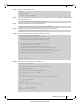
Step 1. Change to Config mode Run:
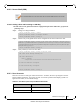
Step 2. Add an entry to the global known-hosts configuration file and its SSH value. Run:
Step 3. Verify what keys exist in the host. Run:
4.10.3 User Accounts
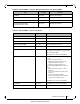
There are two user account types: admin and monitor. As admin, the user is privileged to execute
all the available operations. As monitor, the user can execute operations that display system con-
figuration and status, or set terminal settings.
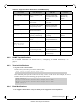
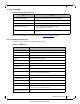
Table 23 - User Roles (Accounts) and Default Passwords
User Role Default Password
admin admin
monitor monitor
It is recommended not to use more than 100 concurrent SSH sessions to the switch.
switch [standalone: master] > enable
switch [standalone: master] # configure terminal
switch [standalone: master] (config) #
switch [standalone: master] (config) # ssh client global known-host "myserver ssh-rsa
AAAAB3NzaC1yc2EAAAABIwAAAIEAsXeklqc8T0EN2mnMcVcfhueaRYzIVqt4rVsrERIjmlJh4mkYYIa8hGGikNa+
t5xw2dRrNxnHYLK51bUsSG1ZNwZT1Dpme3pAZeMY7G4ZMgGIW9xOuaXgAA3eBeoUjFdi6+1BqchWk0nTb+gMfI/
MK/heQNns7AtTrvqg/O5ryIc=”
switch [standalone: master] (config) #
switch [standalone: master] (config) # show ssh client
SSH client Strict Hostkey Checking: ask
SSH Global Known Hosts:
Entry 1: myserver
Finger Print: d5:d7:be:d7:6c:b1:e4:16:df:61:25:2f:b1:53:a1:06
No SSH user identities configured.
No SSH authorized keys configured.
switch [standalone: master] (config) #