
Mellanox MLNX-OS® User Manualfor SX1018HP Ethernet Managed Blade Switch



Rev 1.6.9
Mellanox Technologies
47
Mellanox Technologies Confidential
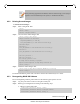
• To save the configuration to the active configuration file, run:
switch (config) # configuration write
• To save the configuration to a user-specified file without making the new file the active
configuration file, run:
switch (config) # configuration write to myconf no-switch
• To save the configuration to a user-specified file and make the new file the active con-
figuration file, run:
switch (config) # configuration write to myconf
• To display the available configuration files and the active file, run:
switch (config) # show configuration files
initial
myconf (active)
switch (config) #
For further information, please refer to Mellanox MLNX-OS Command Reference Guide.
4.3.2 Loading a Configuration File
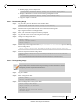
By default, or after a system reset, the system loads the default “initial” configuration file.
T
o load a different configuration file and make it the active configuration:
For further information, please refer to Mellanox MLNX-OS Command Reference Guide.
4.3.3 Restoring Factory Default Configuration on a Switch System
(Single Management Module)
In cases where the system configuration becomes corrupted it is suggested that you restore the
factory default configuration.
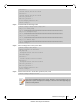
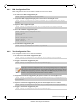
Step 1. Enter Config mode. Run:
Step 2. Run the command
reset factory [reboot] [keep-basic] [keep-all-config]
:.
4.4 Managing Configuration Files
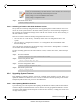
There are two types of configuration files that can be applied on the switch, BIN files (binary)
and text-based configuration files.
switch [standalone: master] >
switch [standalone: master] > enable
switch [standalone: master] # configure terminal
switch [standalone: master] (config) # configuration switch-to myconfig
switch [standalone: master] (config) #
switch [standalone: master] > enable
switch [standalone: master] # configure terminal
switch [standalone: master] (config) #
switch [standalone: master] (config) # reset factory keep-basic