
Mellanox MLNX-OS® User Manualfor SX1018HP Ethernet Managed Blade Switch



Rev 1.6.9
Mellanox Technologies
46
Mellanox Technologies Confidential
If one or more of the switch modules is programmed with a firmware version other than the
default version, then MLNX-OS will automatically attempt to burn the default firmware version
instead.
To verify that the firmware update was successful, login to MLNX-OS and run the command
“show asic-version” (can be run in any mode). This command lists all of the switch modules
along with their firmware versions. Make sure that all the firmware versions are the same and
match the default firmware version. If the firmware update failed for one or more modules, then
the following warning is displayed.
Warning: Some of the subsystems are not updated with default FW <ver>.
4.2.4.2 Importing Firmware and Changing the Default Firmware
To perform an automatic firmware
update by MLNX-OS for a different switch firmware version
without changing the MLNX-OS version, import the firmware package as described below.
MLNX-OS sets it as the new default firmware and performs the firmware update automatically
as described in the previous subsections.
Default Firmware Change on Standalone Systems
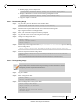
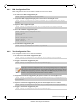
Step 1.
Import the firmware image (.tgz file). Run:
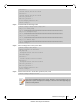
Step 2. Save the configuration. Run:
Step 3. Reboot the system to enable auto update.
4.3 File Management
4.3.1 Saving a Configuration File
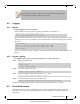
To save the current configuration to the active configuration file, you can either use the con-
figuration write command (requires
running in Config mode) or the write memory
command (requires running in Enable mode).
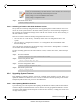
If a firmware update takes place, then the login process will be delayed for a few min-
utes.
If you detect a firmware version mismatch for one or more modules of the switch sys-
tem, please contact your assigned Mellanox Technologies field application engineer.
switch (config) # image fetch
switch (config) # image default-chip-fw fw-SX-rel-9_1_2090.tgz
Default Firmware 9.1.2090 updated. Please save configuration and reboot for new FW to
take effect.
switch (config) #
switch (config) # configuration write
switch (config) #