
Mellanox MLNX-OS® User Manualfor SX1018HP Ethernet Managed Blade Switch



Rev 1.6.9
Mellanox Technologies
45
Mellanox Technologies Confidential
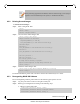
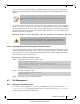
Step 7. Reload the switch. Run:
4.2.3.3 Switching to Partition with Older Software Version
The system saves a backup configuration file when upgrading from an older software version to a
newer one. If the system returns to the older software partition, it uses this backup configuration
file. Note that all configuration changes done with the new software are lost when returning to
the older software version.
There are 2 instances where the backup configuration file does not exist:
• The user has run “reset factory” command, which clears all configuration files in the
system
• The user has run “configuration switch-to” to a configuration file with different name
then the backup file
Also note that the configuration file becomes empty if the switch is downgraded to a software
version which has never been installed yet.
To allow switching partition to the older software version, in these cases above, follow the steps
below:
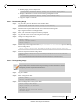
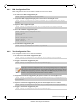
Step 1. Run the command:
Step 2. Set the boot partition. Run:
Step 3. Save the configuration. Run:
Step 4. Reload the system. Run:
4.2.4 Upgrading System Firmware
Each MLNX-OS software package version has a default switch firmware version. When you
update the MLNX-OS software to a new version, an automatic firmware update process will be
attempted by MLNX-OS. This process is described below.
4.2.4.1 After Updating MLNX-OS Software
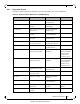
Upon rebooting your switch system after updating the MLNX-OS software, MLNX-OS software
will first compare its default firmware version with the currently programmed firmware versions
on all the switch modules (leafs and spines on director-class switches, or simply the switch card
on edge switch systems).
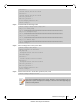
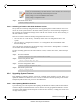
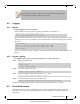
In case you are downloading to an older software version which has never been run yet
on the switch, use the following command sequence as well:
switch (config) # no boot next fallback-reboot enable
switch (config) # configuration write
switch (config) # reload
switch (config)# no boot next fallback-reboot enable
switch (config)# image boot next
switch (config)# configuration write
switch (config)# reload