
Mellanox MLNX-OS® User Manualfor SX1018HP Ethernet Managed Blade Switch



Rev 1.6.9
Mellanox Technologies
41
Mellanox Technologies Confidential
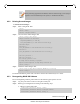
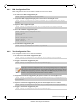
Step 9. Save current configuration. Run:
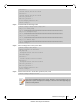
Step 10. Reboot the switch to run the new image. Run:
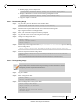
new_image.img
SX <new ver> 2011-04-28 16:52:50
Installed images:
Partition 1:
SX <old ver> 2011-04-28 16:02:50
Partition 2:
SX <new ver> 2011-04-28 16:52:50
Last boot partition: 1
Next boot partition: 2
No boot manager password is set.
switch (config) #
switch (config) # configuration write
switch (config)#
switch (config) # reload
Configuration has been modified; save first? [yes] yes
Configuration changes saved.
Rebooting...
switch (config)#
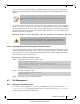
After software reboot, the software upgrade will also automatically upgrade the firm-
ware version.
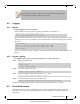
On SX65XX systems with dual management, the software must be upgraded on both
the Master and the Slave units.
In order to upgrade the system on dual management system refer to Section 4.2.1,
“Upgrading MLNX-OS® Software,” on page 38.