
Mellanox MLNX-OS® User Manualfor SX1018HP Ethernet Managed Blade Switch


Rev 1.6.9
Mellanox Technologies
34
Mellanox Technologies Confidential
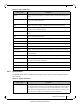
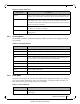
The IB SM Mgmt menu makes available the following sub-menus (listed in order of appearance
from top to bottom):
Table 19 - IB SM Mgmt Submenus
Submenu Title Description
Summary Displays the local Subnet Manager (SM) status (running time, failures, etc).
Base SM Used to manage basic SM configuration (enabl
ing SM, priority level, and restor-
ing initial configuration).
Advanced SM Used to manage basic SM configuration (enabl
ing SM, priority level, and restor-
ing initial configuration).
Expert SM Used to configure security and GUID bas
ed prefixes (m_key, sm_key, sa_key,
etc), and to manage special SM attributes that should not be changed except by
expert users of the Subnet Manager who understand the risks of manipulating
these attributes.
Compute nodes Used to add compute nodes using network adapter port GUIDs.
Root nodes Used to add root nodes using switch GUIDs.
Partitions Manages partition keys (sets removes or displ
ays the partition keys).
Basic Qos Used to configure basic QoS attrib
utes such as default QoS settings, and VL
arbitration low and high entries. It is also used to display and manage SL to VL
mappings.
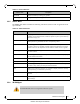
3.2.7 Fabric Inspector
The Fabric Inspctr menu makes available the following sub-menus (listed in order of appear-
ance from top to bottom):
The Fabric Inspctr menu is not applicable when the switch profile is not InfiniBand.
The Fabric Inspctr menu requires a license (LIC-fabric-inspector)
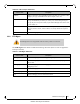
Table 20 - Fabric Inspctr Submenus
Submenu Title Description
Summary Displays a fabric status summary, including the time of last fabric update, what
systems are in the fabric, what InfiniBand devices are identified, etc.
IB Systems Displays information about al
l identified InfiniBand systems in the fabric (adapt-
ers, switches, etc).