
Mellanox MLNX-OS® User Manualfor SX1018HP Ethernet Managed Blade Switch


Rev 1.6.9
Mellanox Technologies
33
Mellanox Technologies Confidential
3.2.5 Status Menu
The Status menu makes available the following sub-menus (listed in order of appearance from
top to bottom):
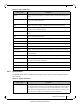
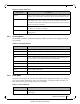
Table 18 - Status Submenus
Submenu Title Description
Summary Displays general information about the switch system and the MLNX-OS image,
including: current date and time, hostname, uptime of system, system memory,
CPU load averages, etc.
Profile and Capabilities Displays general information about the switch system capabilities such as the
enabled
profiles (e.g IB/ETH) and their corresponding values.
Temperature Provides a graphical display of the switch module
sensors’ temperature levels
over time (1 hour). It is possible to display either the temperature level of one
module’s sensor or the temperature levels of all the module sensors’ together.
Power Supplies Provides a graphical display of one of the switch’s power supplies voltage level
over tim
e (1 hour).
Fans Provides a graphical display of fan speeds over time (1 hour). The display is per
fan
unit within a fan module.
CPU Load Provides a graphical display of the management CPU load over time (1 hour).
Memory Provides a graphical display of memory utilization over time (1 day).
Network Provides a graphical display of network usage (trans
mitted and received packets)
over time (1 day). It also provides per interface statistics.
Logs Displays the system log messages. It is possible to display either the currently
saved system
log or a continuous system log.
Maintenance Used to perform specific maintenance operations
automatically on a predefined
schedule.
Alerts Used to display a list of the recent health alerts and ena
bles the user to configure
health settings.
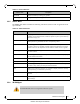
3.2.6 IB SM Mgmt
Phy Profile Provides the ability to manage phy profiles.
Protocol type Manages the link protocol type
The IB SM MGMT menu is not supported in Ethernet systems.
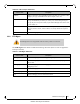
Table 17 - Ports Submenus
Submenu Title Description