
Mellanox MLNX-OS® User Manualfor SX1018HP Ethernet Managed Blade Switch


Rev 1.6.9
Mellanox Technologies
32
Mellanox Technologies Confidential
3.2.3 Security Menu
The Security menu makes available the following sub-menus (listed in order of appearance from
top to bottom):
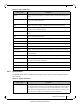
Table 16 - Security Submenus
Submenu Title Description
Users Used to manage (setting up, removing, modifying) user accounts.
Admin Password Used to modify the system administrator password.
SSH Used to display and generate host keys.
AAA Used to configure AAA (Authentication, Authorization, and Accounting) secu-
rity services such as authentication
methods and authorization.
Login Attempts Used to manage login attempts
RADIUS Used to manage Radius client.
TACACS+ Used to manage TACACS+ client.
LDAP Used to manage LDAP client.
Certificate Used to manage certificates.
3.2.4 Ports Menu
The Ports menu displays the port state and enables some configuration attributes of a selected
port. It also enables modification of the port configuration. A graphical display of traffic over
time (last hour or last day) through the port is also available.
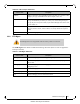
Inventory Displays a table with the following information about the system modules: mod-
ule name, type, serial number, ordering part number and Asic firmware version.
Power Management Displays a table with the following information about the system power supplies:
pow
er supply name, power, voltage level, current consumption, and status. A
total power summary table is also displayed providing the power used, the power
capacity, and the power available.
MLNX-OS Upgrade Displays the installed MLNX-OS images (and the active partition), to upload a
new image,
and to install a new image.
Reboot Used to reboot the system. Make sure that y
ou save your configuration prior to
clicking reboot.
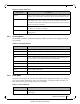
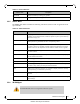
Table 17 - Ports Submenus
Submenu Title Description
Ports Manages port attributes, counters, transceiver info and displays a graphical coun-
ters histogram.
Table 15 - System Submenus
Submenu Title Description